Ford As-Built Data Server Problems
By Mike Lundgren
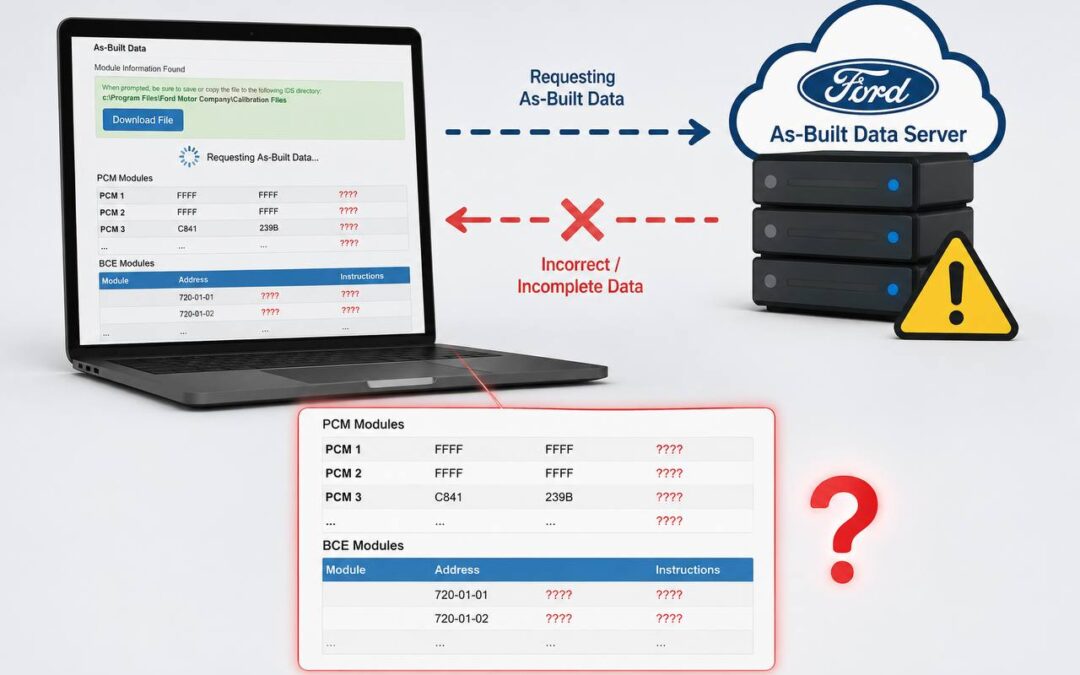
Ford’s server-stored as-built data is frequently incorrect or missing, causing programming failures when replacing control modules. This widespread issue affects both IDS and FDRS platforms and can leave vehicles disabled if not properly addressed. The solution involves identifying the incorrect data and filing a Service Information Report (SIR) with NASDIF to get Ford’s server corrected.
Understanding Ford As-Built Data and Common Problems
As-built data (also called configuration in FDRS) is the coding that tells a replacement module which options your specific vehicle has equipped. When you perform a Programmable Module Installation (PMI), the Ford software pulls this coding from Ford’s server based on the VIN number.
The problem occurs when Ford’s server data is wrong or incomplete for your specific VIN. This can manifest as:
- Programming errors during the PMI process
- Fault codes appearing after module installation
- Vehicle features not working correctly
- Complete vehicle disable in severe cases
The issue affects all Ford, Lincoln, and Mercury vehicles across both the legacy IDS platform (1996-2018) and the current FDRS system (2018-present).
How to Identify Incorrect As-Built Data
You can verify Ford’s server data by visiting MotorCraftService.com and navigating to Quick Guides > Module As-Built Data. This free service lets you see exactly what coding Ford has stored for any VIN without requiring a login.
Compare this server data to what’s actually in the module using diagnostic tools. The most effective tool for this is Forscan, which provides clear visibility into:
- Current module coding blocks
- Number of coding blocks (critical for compatibility)
- Ability to save and restore coding data
- Direct comparison with Ford server data
Warning signs of incorrect server data include mismatched block counts (for example, the module expects 8 digits of coding but Ford’s server only provides 4) or Forscan displaying “amount of blocks does not match” warnings.
The Importance of Saving Original Modules
The easiest solution to as-built data problems is having the original module available. Ford’s programming software can extract the correct coding from the original module and transfer it to the replacement, bypassing potentially incorrect server data entirely.
Always save original modules when possible, even if they appear completely failed. Many modules that show “no communication” can still have their coding data extracted using specialized tools.
Filing a Service Information Report (SIR) to Fix Server Data
When you’ve confirmed Ford’s server data is incorrect and don’t have the original module, the official solution is filing a SIR through NASDIF at diag.net. This process requires:
- Screenshots showing the incorrect server data
- Documentation of what coding is actually in the module
- VIN number and specific module information
- Details about tools used and procedures attempted
- Evidence of contacting Ford technical support first
Ford typically responds within a week and can correct the server data for your specific VIN. Once corrected, the PMI process should complete successfully.
Alternative Solutions and Workarounds
Forscan offers additional capabilities beyond just identifying problems:
- Manual coding entry and editing
- Saving coding files for future use
- Built-in configuration options for common modifications
- Community forums with decoded as-built information
Building a library of saved as-built files from working vehicles can provide backup options when server data fails, though this approach requires careful matching of part numbers and vehicle specifications.
What This Means for Your Shop
Ford as-built data problems can significantly impact shop productivity and customer satisfaction. A single incorrect coding file can disable a vehicle for a week while waiting for Ford to correct their server data. This makes proper preparation and diagnostic procedures essential.
Key strategies for managing this issue include:
- Always requesting customers save original modules
- Verifying as-built data before starting programming
- Having backup diagnostic tools like Forscan available
- Understanding the SIR filing process for quick resolution
The frequency of these problems makes Ford programming more complex than it should be, requiring additional time and expertise to navigate successfully.
Expert Ford Programming Services in the Twin Cities
ST Mobile Auto provides comprehensive Ford module programming services throughout the Minneapolis-St. Paul metro area. Our team has extensive experience identifying and resolving as-built data problems, ensuring your Ford programming jobs are completed correctly the first time.
We offer on-site programming at your shop location, plus mail-in services for complex modules that require specialized attention. Our technicians are equipped with both Ford factory tools and advanced diagnostic equipment like Forscan to handle even the most challenging programming scenarios.
Don’t let incorrect Ford server data shut down your shop. Contact ST Mobile Auto at
Need Help With This?
We handle jobs like these every day for shops across the Twin Cities.